The Query Builder has four main parameters that can be used to assemble a query.
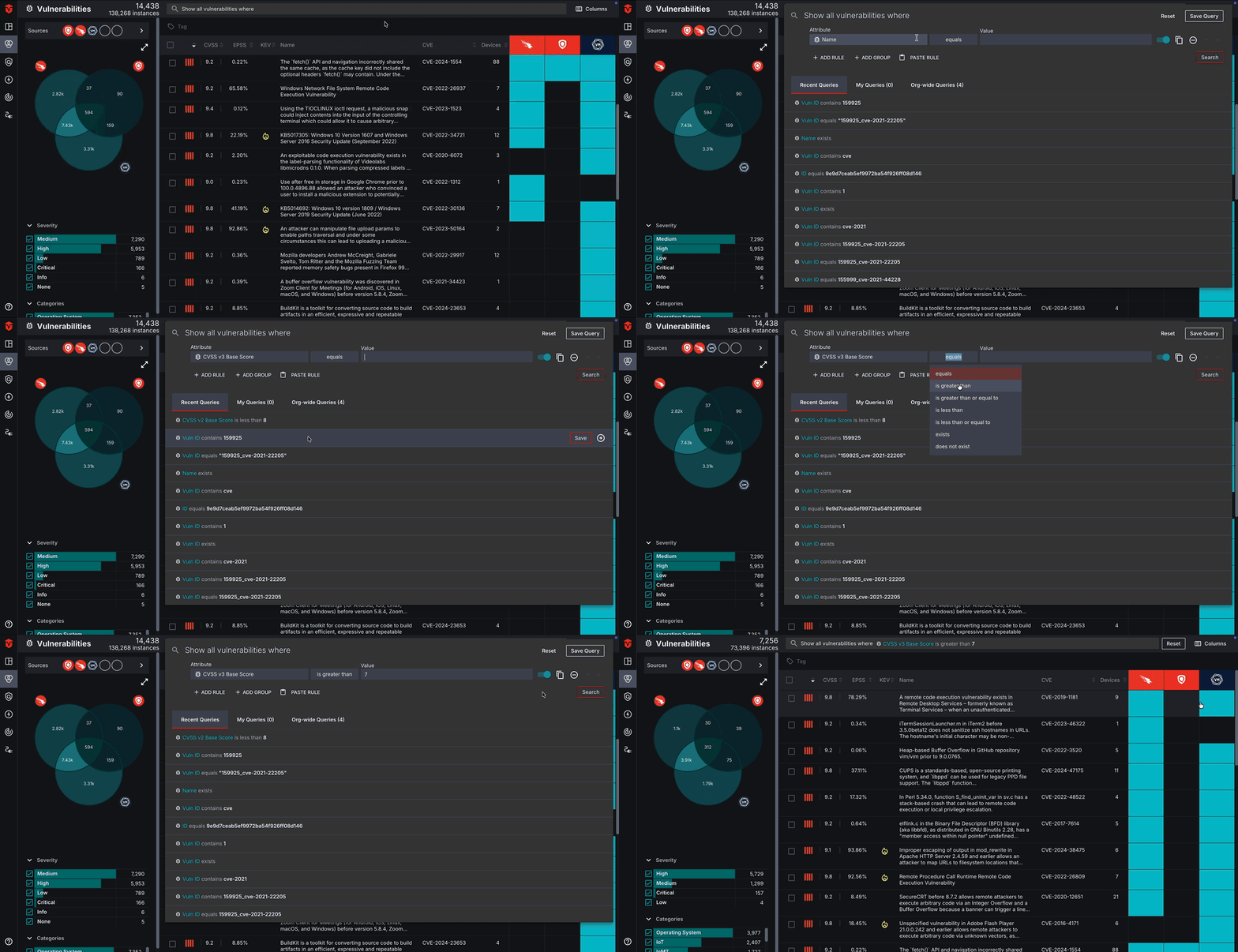
The Attribute parameters allow you to select the what data attribute(s) you would like to build your query around. Select the Attribute field to begin defining this parameter.
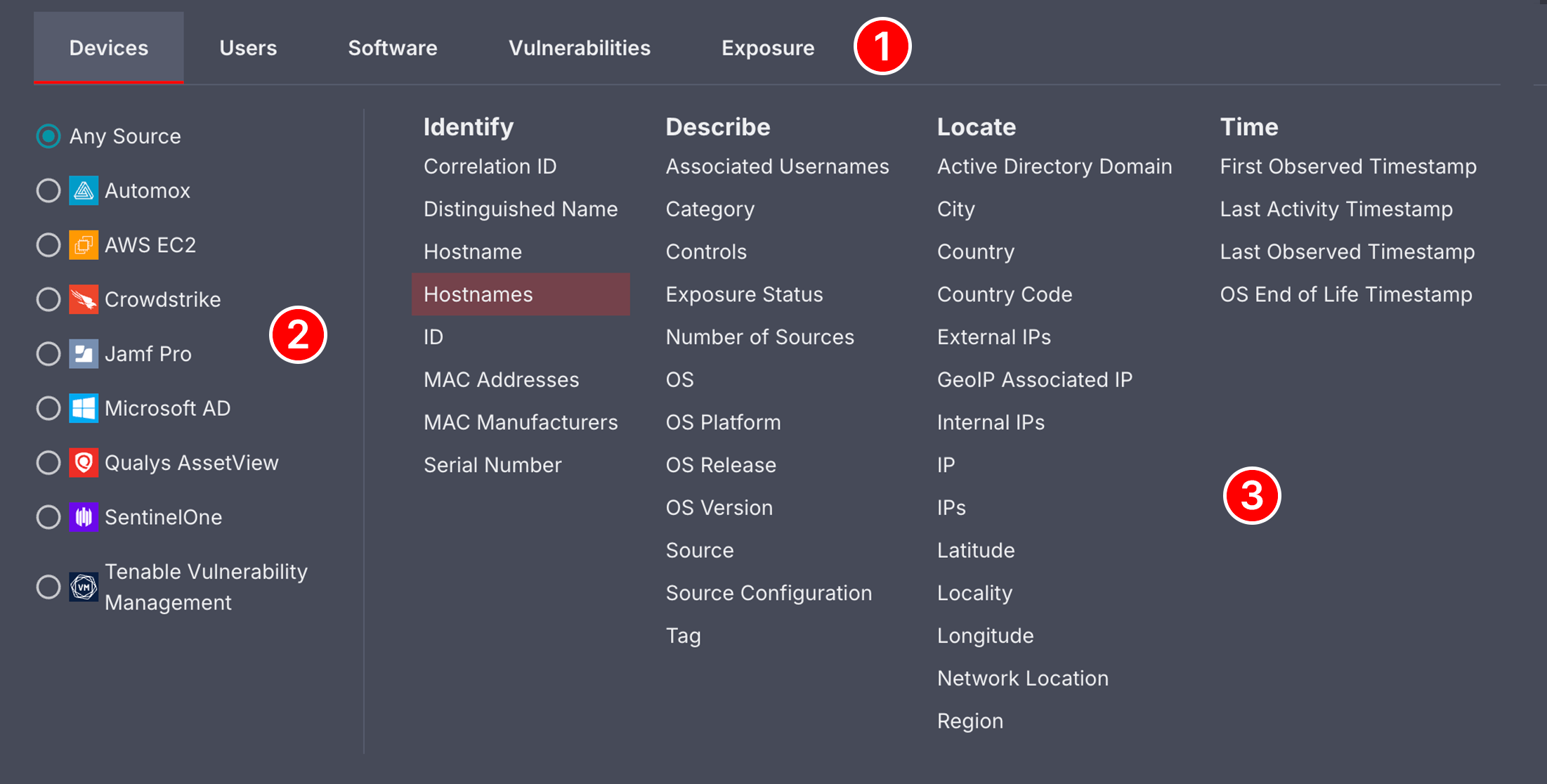
The attributes menu is broken down into several areas:
-
At the top of the menu, there are Devices and User tabs. The tab corresponding to the Live Inventory page you are in is selected by default. These tabs are primarily used for cross-asset searches, which will be covered in a later section.
-
The left-panel contains a list Sources. If needed, use this section to specify if you would only like to include assets from a specific Source in your rule's condition.
-
The right-panel is where you will select what data Attribute(s) you would like to build your query around.
The Condition parameter is used to define the condition an attribute must meet to meet a rule's requirements. Only assets and telemetry events that satisfy your conditions will be displayed in your results.
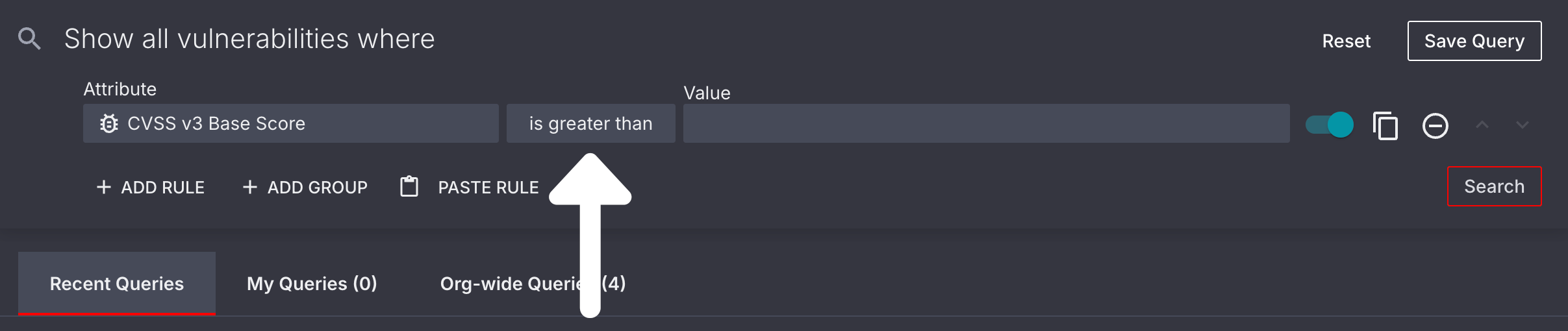
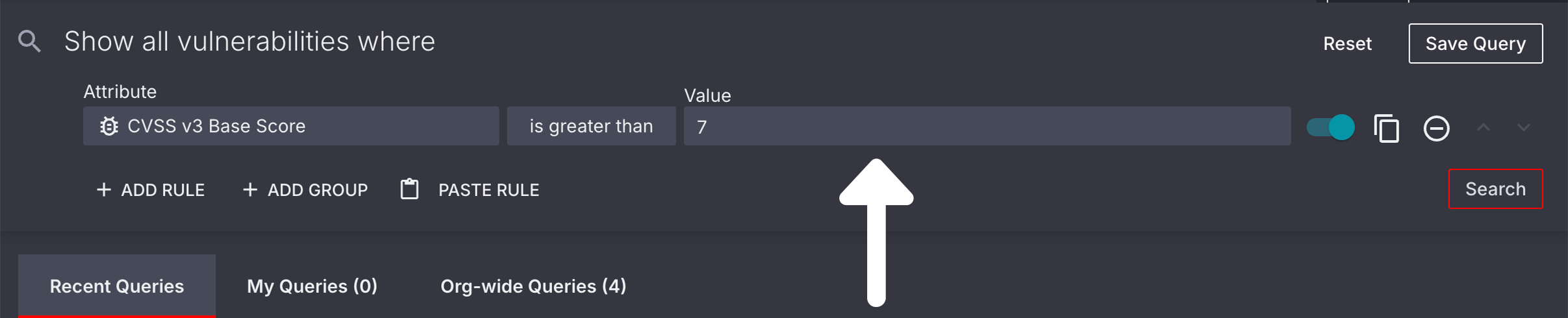
Once you've selected an attribute and condition, you will need to define the Value you will be using to determine if a condition is satisfied. Please note that this field will not display when the Exists or Does not exist condition is selected, as the value is already defined in the condition itself.
ℹ️In some instances, you may be asked to select a value from a pre-defined list of values. This is dependent on the attribute you have chosen.
ℹ️This Attributes list excludes Source-specific attributes. For questions about these attributes, please contact our Support team.
Please review the tables below for a list of Source attributes for each query builder in the Sevco platform. You will also find every possible condition and value that can be applied to an attribute.
| Attribute | Definition | Example |
|---|
Correlation ID | A unique ID assigned to a Device asset that is used to correlate it with other assets | Correlation ID equals 8a580770-6ec9-480b-b5dc-50508fbc6749 |
Distinguished Name | The name typically associated with or issued by Directory Service Source integrations. | Distinguished Name equals cn=fcfdlfs,ou=dpnqvufst oz,ou=bluth dpnqvufst,dc=bluth-dp,dc=com |
Hostname | Any device name associated with a Device asset. Unlike an Object ID this attribute can change | Hostname equals victorias-macbook-pro |
Hostnames | Any device names associated with a Device asset. Unlike Hostname this attribute can have multiple values per Device. | Hostnames equals victorias-macbook-pro
Hostnames equals victorias-laptop |
ID | The unique asset ID used to identify a Device asset | ID equals ec1652be6765fd1d34394255c1c9c1ee |
MAC Addresses | Any MAC address associated with a Device asset | MAC Address equals 02:FF:00:BA:C0:39 |
MAC Manufacturers | The MAC manufacturer who manufactured a piece of network hardware on a Device asset | MAC Manufacturer equals Intel Corporate |
Serial Number | The serial number corresponding to a Device asset | Serial Number equals 3N326311QW-01 |
| Attribute | Definition | Example |
|---|
Associated Usernames | Any usernames associated with a Device asset | _Associated Usernames is like john_* |
Category | The Category that a Source integration falls under | Category equals Enterprise Endpoint |
Controls | The Enterprise Endpoint subcategory that identifies the type of source control present for a Device asset | Controls equals Configuration Management |
Exposure Status | The remediation status of an Device asset that has been impacted by an Exposure vulnerability. Learn more | Exposure ID equals Open |
Number of Sources | The total number of Sources that have identified a Device asset | Number of Sources equals 3 |
OS | The operating system of a Device asset | OS Release equals Windows 11 Professional (x64) |
OS Platform | The operating system platform of a Device asset | OS Platform equals Windows |
OS Release | The specific identity of a Device asset's operating system (if available) | OS Release equals Windows 11 Professional |
OS Version | The specific version of a Device asset's operating system. | OS Platform equals MacOS
_OS Version is like 12.6_* |
Source | The name of the Source Integration that has detected a Device asset | Source equals Crowdstrike |
Source Configuration | The configuration ID of a Source Integration that has detected a Device asset | Source Configuration equals Microsoft Azure(01234567-0123-abcd-abcd-0123456789ab) |
Tag | Any Tag that has been applied to a Device asset | Tag equals Password Expired |
| Attribute | Definition | Example |
|---|
Active Directory Domain | The specific Active Directory domain name assigned to a Device asset. | Active Directory Domains equals company.com |
City | The City corresponding to a Device asset's External IP address | City equals Brooklyn |
Country | The Country corresponding to a Device asset's External IP address | Country equals Italy |
Country Code | The Country Code of the country corresponding to a Device asset's External IP address | Country Code equals DE |
External IPs | The External IP Address associated with any network a Device asset has connected to | IP Address between 192.158.1.10 (and) 192.158.1.40 |
GeoIP Associated IP | An IP Address that has been mapped to a specific physical or geolocation using IP geolocation data services. | GeoIP Associated IP equals 142.250.0.0 |
Internal IPs | The Internal IP Address associated with any network a Device asset has connected to. | IP Address equals 192.168.1.1 |
IP | The IP Address of the Device asset on a network. | IP Address equals 10.10.4.217 |
IPs | The IP Addresses of the Device asset on a network. Unlike IP Address this attribute can have multiple values per Device. | IP Address equals 10.10.4.217
IP Address equals 10.10.4.218 |
Latitude | The latitude corresponding to a Device asset's External IP address | Latitude equals 37.4221° N |
Locality | The city or town associated with a Device asset's geolocation record, determined by a Geolocation Associated IP | Locality equals Pittsburg |
Longitude | The longitude corresponding to a Device asset's External IP address | Longitude equals 122.0841° W |
Network Location | The Network type a Device asset is associated with: On Premise, Cloud, or Unknown (typically listed as a location if available) | Network Location does not equal Cloud |
Region | The world region corresponding to a Device asset's External IP address | Region equals Europe |
| Attribute | Definition | Example |
|---|
First Observed Timestamp | The first time a Device asset was identified as present in your environment by a Source Integration | First Observed Timestamp is before 05/17/23 12:00 AM |
Last Activity Timestamp | The last time a Device asset was identified as active on a network | Last Activity Timestamp is after 05/18/23 12:00 AM |
Last Observed Timestamp | The last time a Device asset was identified as present in your environment by a Source Integration | Last Observed is before 3 days ago |
OS End of Life Timestamp | The date and time that a Device asset's operating system enters an end-of-life state (is no longer supported by its vendor) | OS End of Life Timestamp is on or before 30 days ago |
| Attribute | Definition | Example |
|---|
Correlation ID | A unique ID assigned to a User asset that is used to correlate it with other assets | Correlation ID equals 8a580770-6ec9-480b-b5dc-50508fbc6749 |
Emails | Any Emails associated with a User asset | Email equals [email protected] |
First Name | The first name associated with a User asset | First Name equals John |
ID | The unique asset ID used to identify a User asset | ID equals ec1652be6765fd1d34394255c1c9c1ee |
Last Name | The last name associated with a User asset | Last Name equals Smith |
Usernames | Any usernames associated with a User asset | Usernames equals janesmith |
| Attribute | Definition | Example |
|---|
Number of Sources | The total number of Sources that have identified a User asset | Number of Sources equals 3 |
Source | The name of the Source Integration that has detected an User asset | Source equals Crowdstrike |
Source Configuration | The configuration ID of a Source Integration that has detected an User asset | Source Configuration equals Microsoft Azure(01234567-0123-abcd-abcd-0123456789ab) |
Tag | Any Tag that has been applied to a User asset | Tag equals Password Expired |
| Attribute | Definition | Example |
|---|
First Observed Timestamp | The first time a User asset was identified as present in your environment by a Source Integration | First Observed Timestamp is before 05/17/23 12:00 AM |
Last Activity Timestamp | The last time a User asset was identified as active on a network | Last Activity is after 05/18/23 12:00 AM |
Last Observed Timestamp | The last time a User asset was identified as present in your environment by a Source Integration | Last Observed is before 3 days ago |
| Attribute | Definition | Example |
|---|
Correlation ID | A unique ID assigned to softwareVulnerabilities to correlate them with the assets they are impacting | Correlation ID equals 8a580770-6ec9-480b-b5dc-50508fbc6749 |
CVE | Any Common Vulnerabilities and Exposures (CVE) codes associated with a software Vulnerability. Please note that some vulnerabilities may contain multiple CVEs or none at all. | CVE equals CVE-2018-17456 |
ID | The unique asset ID used to identify a software Vulnerability | ID equals 9e9d7ceab5ef9972ba54f926ff08d146 |
Name | The name of a potential software Vulnerability that a Source integration has identified on a Device asset | _Vulnerability is like Adobe Flash_* |
Vuln ID | [Couldn't query for this in product] | [Couldn't query for this in product] |
| Attribute | Definition | Example |
|---|
CVSS Score | A numerical rating from 0.0-10.0 that indicates the severity of a known software Vulnerability. Learn more | CVSS Score is greater than 4.5 |
CVSS v2 Base Score | A numerical rating from 0.0-10.0 that indicates the severity of a known software Vulnerability, using an older version of the Common Vulnerability Scoring System (CVSS). This score is determined when a software Vulnerability is first discovered.
Sevco uses this score in conjunction with other CVSS scores to determine the overall severity of a vulnerability. Learn more | CVSS v2 Base Score is greater than 6.9 |
CVSS v2 Temporal Score | A numerical rating from 0.0-10.0 that indicates the severity of a known software Vulnerability, using an older version of the Common Vulnerability Scoring System (CVSS). This score may change depending on factors such as the time a software Vulnerability has been present on a Device asset.
Sevco uses this score in conjunction with other CVSS scores to determine the overall severity of a vulnerability. Learn more | CVSS v2 Temporal Score is greater than or equal to 7.0 |
CVSS v3 Base Score | A numerical rating from 0.0-10.0 that indicates the severity of a known software Vulnerability, using the most recent version of the Common Vulnerability Scoring System (CVSS). This score is determined when a software Vulnerability is first discovered.
Sevco uses this score in conjunction with other CVSS scores to determine the overall severity of a vulnerability. Learn more | CVSS v3 Base Score is greater than 6.9 |
CVSS v3 Temporal Score | A numerical rating from 0.0-10.0 that indicates the severity of a known software Vulnerability, using the most recent version of the Common Vulnerability Scoring System (CVSS). This score may change depending on factors such as the time a software Vulnerability has been present on a Device asset.
Sevco uses this score in conjunction with other CVSS scores to determine the overall severity of a vulnerability. Learn more | CVSS v3 Temporal Score is greater than 8.9 |
EPSS Percentile | The relative ranking from 0.0 - 1.0 of a software Vulnerability's EPSS score compared to all other scored vulnerabilities. | EPSS Percentile is greater than .75 |
EPSS Score | A score from 0.0 - 1.0 that indicates the likelihood of a specific software Vulnerability (CVE) being exploited within the next 30 days (Learn more) | EPSS Score is greater than .5 |
Severity | The severity of a software Vulnerability on a Device asset, determined by a Source integration's software vendor | Severity equals High |
| Attribute | Definition | Example |
|---|
Categories | The Category(ies) that represents the area of security hygiene that a software Vulnerability negatively impacts | Categories equals MacOS X Local Security Checks |
CWE ID | The Common Weakness Enumeration ID assigned to a specific type of software or hardware security weakness in the CWE catalog. Learn more | CWE ID equals CWE-89 |
CWE Name | The name of a Common Weakness Enumeration. Learn more | CWE Name equals Password in Configuration File |
Number of Sources | The total number of Sources that have identified a software Vulnerability | Number of Sources equals 3 |
NVD Status | The status of a software Vulnerability in the National Vulnerability Database. (Learn more) | NVD Status equals Received |
Port | The port that is being impacted by a software Vulnerability | Port equals 445 |
Product | The product name of a piece of hardware or software that is being impacted by a software Vulnerability | Product equals 1password |
Product Type | The category that an impacted piece of hardware or software falls under. | Product Type equals Application |
Protocol | The network protocol used by a software Vulnerability to gain access to a Device asset | Protocol equals TCP |
Source | The name of the Source Integration that has detected software Vulnerability | Source equals Qualys AssetView |
Source Configuration | The configuration ID of a Source Integration that has detected a software Vulnerability | Source Configuration equals Crowdstrike 3c8f8b45-06d1-40ba-a162-0414196caa8a |
Tag | Any Tag that has been applied to a software Vulnerability | Tag equals Adobe |
Vendor | The name of the Vendor who supplies a piece of hardware of software that is being impacted by a software Vulnerability | Vendor equals Adobe |
| Attribute | Definition | Example |
|---|
Botnets Count | The number of botnets (networks of compromised devices) associated with a software Vulnerability | Botnets Count is greater than 0 |
CAPEC Attack Pattern ID | The ID of a CAPEC Attack Pattern. Learn more | CAPEC Attack Pattern ID equals CAPEC-233 |
CAPEC Attack Pattern Name | The Name of a CAPEC Attack Pattern. Learn more | CAPEC Attack Pattern Name equals Privilege Escalation |
Commercial Exploit Found | An exploit that is often developed and sold by a company for penetration testing and other professional contexts | Commercial Exploit Found equals True |
Exploit Availability | How an exploit can be obtained | Exploit Availability equals publically-available |
Exploit Maturity | The maturity of an exploit | Exploit Maturity equals POC |
Exploit Type | An exploit's type | _Exploit Type equals `` |
Exploits Count | The number of exploits carried out on a software Vulnerability | Exploits Count equals 1 |
Max Exploit Maturity | The maturity of the most mature exploit carried out on a software Vulnerability | Max Exploit Maturity equals POC |
MITRE ATT&CK Tactics | The Tactics used in a MITRE ATT&CK Technique. <Anchor label="Learn more" target="_blank" href="The Name of a MITRE ATT&CK Technique. Learn more | MITRE ATT&CK Tactics equals privilege-escalation |
MITRE ATT&CK Technique ID | The ID of a MITRE ATT&CK Technique. Learn more | MITRE ATT&CK Technique ID equals T1068 |
MITRE ATT&CK Technique Name | The Name of a MITRE ATT&CK Technique. Learn more | MITRE ATT&CK Technique Name equals Exploitation for Privilege Escalation |
Public Exploit Found | An exploit that is publicly-available, often as a proof-of-concept | Public Exploit Found equals True |
Ransomware Families Count | The number of Ransomware Families associated with a software Vulnerability | Ransomware Families Count equals 1 |
Threat Actor Name | The name of the individual, group, or entity trying to exploit a software Vulnerability | Threat Actor Name equals Cozy Bear |
Threat Actors Count | The number of Threat Actors trying to exploit a software Vulnerability | Threat Actors Count equals 1 |
Weaponized Exploit Found | Identifies software Vulnerabilities that have known exploits that have been weaponized. | Weaponized Exploit Found equals True |
| Attribute | Definition | Example |
|---|
CISA KEV Added | When a software Vulnerability was first added to CISA's Known Exploited Vulnerability list. [Learn more](https://www.cisa.gov/known-exploited-vulnerabilities-catalog">Learn more | CISA KEV Added is on or before 08/25/25 12:00 AM |
First Found Timestamp | When a software Vulnerability was first identified on a Device asset by a Source Integration | First Found is on or before 06/07/23 12:00 AM |
First Observed Timestamp | The first time a software Vulnerability was identified as present in your environment by a Source Integration | First Observed Timestamp is before 05/17/23 12:00 AM |
Last Found Timestamp | The last time a software Vulnerability was identified on a Device asset by a Source Integration | Last Found is on or after 06/10/23 12:00 AM |
Last Observed Timestamp | The last time a software Vulnerability was identified as present in your environment by a Source Integration | Last Observed is before 3 days ago |
VulnCheck KEV Added | When a software Vulnerability was first added to VulnCheck's Known Exploited Vulnerability list. Learn more | VulnCheck KEV Added is on or before 08/25/25 12:00 AM |
| Attribute | Definition | Example |
|---|
ID | The unique ID used to identify an Exposure vulnerability | ID equals 38f03959-baa1-420a-b43d-9bdccc25194c |
Name | The Name of an Exposure vulnerability | Name equals US Government Banned Devices |
| Attribute | Definition | Example |
|---|
Severity | The level of Severity assigned to an Exposure vulnerability. Learn more | Severity equals Critical |
| Attribute | Definition | Example |
|---|
Asset Type | The asset class that is impacted by an Exposure vulnerability | Asset Type equals Devices |
Categories | The Category(ies) that represents the area of security hygiene that an Exposure vulnerability negatively impacts | Categories equals Control Configuration |
Class | The Class that an Exposure vulnerability falls under. Learn more | Class equals ASCA |
Exposure Status | The remediation status of an asset that has been impacted by an Exposure vulnerability. Learn more | Exposure Status equals Open |
Impact | The description of how an Exposure vulnerability impacts your attack surface | Impact is like The Microsoft Office Products are missing security updates* |
Number of Accepted Risk Assets | The number of assets with an Exposure Status of Accepted Risk for a particular Exposure vulnerability | Number of Accepted Risk Assets is greater than 10 |
Number of In Progress Assets | The number of assets with an Exposure Status of In Progress for a particular Exposure vulnerability | Number of In Progress Assets is less than 10 |
Number of Open Assets | The number of assets with an Exposure Status of Open for a particular Exposure vulnerability | Number of Open Assets is greater than 0 |
Number of Snoozed Assets | The number of assets with an Exposure Status of Snoozed for a particular Exposure vulnerability | Number of Snoozed Assets is greater than 0 |
Number of Total Assets | The total number of assets impacted by an Exposure vulnerability | Number of Total Assets is greater than 50 |
Observation | The Observation of a specific Exposure vulnerability | Observation is like A software vulnerability (CVE) was found* |
Recommendation | The Recommendation for remediating assets impacted by an Exposure vulnerability | Recommendation is like Microsoft has released the following security updates to address this issue* |
| Attribute | Definition | Example |
|---|
Exposure Updated Timestamp | The last time an Exposure Status was updated | Exposure Updated Timestamp is before 3 days ago |
| Attribute | Definition | Example Query |
|---|
Attribute | A piece of information that corresponds to a Device asset | Attribute equals hostnames |
Hostname | Any device name associated with a Device asset. Unlike an Object ID this attribute can change. | Hostname equals victorias-macbook-pro |
Event Timestamp | The date and time that a telemetry event took place | Event Timestamp is after 05/09/23 12:00 AM |
Event Type | The type of telemetry event that has taken place. This includes changes to attributes as well as observation times by Sources. | Event Type equals AttributeValueAdd |
Object ID | A permanent ID number that is assigned by a Source integration to identify a Device asset. Each Source assigns its own Object ID. | SentinelOne Object ID equals 0123456789101112131
ManageEngine Object ID equals 1312111019876543210 |
Source | The name of the Source Integration that has detected a Device asset | Source equals Crowdstrike |
Source Configuration | The configuration ID of a Source Integration that has detected a Device asset | Source Configuration equals Microsoft Azure(01234567-0123-abcd-abcd-0123456789ab) |
Valid Until Timestamp | For AttributeValueAdd telemetry events, the time when the attribute was removed. | Valid Until Timestamp is after 3 days ago |
Value | An attribute Value that has changed during a telemetry event. For example: a Device asset's MAC Address changing. | Value equals 00:50:56:8A:69:73 |
| Attribute | Definition | Example Query |
|---|
Attribute | A piece of information that corresponds to a User asset | Attribute equals emails |
Event Timestamp | The date and time that a telemetry event took place | Event Timestamp is after 05/09/23 12:00 AM |
Event Type | The type of telemetry event that has taken place. This includes changes to attributes as well as observation times by Sources. | Event Type equals AttributeValueAdd |
Object ID | A permanent ID number that is assigned by a Source integration to identify a User asset. Each Source assigns its own Object ID. | SentinelOne Object ID equals 0123456789101112131
ManageEngine Object ID equals 1312111019876543210 |
Source | The name of the Source Integration that has detected a User asset | Source equals Crowdstrike |
Source Configuration | The configuration ID of a Source Integration that has detected a User asset | Source Configuration equals Microsoft Azure(01234567-0123-abcd-abcd-0123456789ab) |
Valid Until Timestamp | For AttributeValueAdd events, the time when the attribute was removed. | Valid Until Timestamp is after 3 days ago |
Value | An attribute Value that has changed during a telemetry event. For example: a User asset's corresponding email being updated. | Value equals [email protected] |
| Attribute | Definition | Example Query |
|---|
Duplicate Group ID | The Group ID of one or more Source Records that have been identified as a duplicate of a Source record that has been successfully processed, aggregated, and correlated with other Source records to form a unified asset. Learn more | Duplicate Group ID equals 4b4653f7-672e-4c7e-8c23-3cef83839158 |
First Collected | When a Source Device was first collected by a specific Source integration | First Collected is on or before 07/31/22 12:00 AM |
FQDN | The fully qualified domain name associated with a Source Device | FQDN exists |
Hostname | Any device name associated with a Source Device. Unlike an Object ID this attribute can change. | Hostname equals victorias-macbook-pro |
IP Address | The IP Address of the Source Device on a network. | IP Address equals 10.10.4.217 |
Last Activity | The last time a Source Device was identified as active on a network | Last Activity is after 05/18/23 12:00 AM |
Last Observed | The last time a Source Device was identified as present in your environment by a Source integration | Last Observed is before 3 days ago |
MAC Address | Any MAC Address associated with a Source Device | MAC Address equals 02:FF:00:BA:C0:39 |
Object ID | A permanent ID number that is assigned by a Source integration to identify a Source Device. Each Source assigns its own Object ID. | SentinelOne Object ID equals 0123456789101112131
ManageEngine Object ID equals 1312111019876543210 |
OS Platform | The operating system platform of a Source Device | OS Platform equals Windows |
OS Release | The specific identity of a Source Device's operating system (if available) | OS Release equals Windows 10 Enterprise |
Record State | A state that indicates whether or not a Source Record has been successfully processed, aggregated, and correlated with other Source records to form a unified asset. Learn more | Record State equals Active |
Serial Number | The serial number corresponding to a Source Device | Serial Number equals 3N326311QW-01 |
| Attribute | Definition | Example Query |
|---|
Duplicate Group ID | The Group ID of one or more Source Records that have been identified as a duplicate of a Source record that has been successfully processed, aggregated, and correlated with other Source records to form a unified asset. Learn more | Duplicate Group ID equals 4b4653f7-672e-4c7e-8c23-3cef83839158 |
Emails | The Email(s) that have been identified in a Source Record with a Source User | Emails equals [email protected] |
First Collected | When a Source User was first collected by a specific Source integration | First Collected is on or before 07/31/22 12:00 AM |
First Name | The first name associated with a Source User | First Name equals John |
Last Activity | The last time a Source User was identified as active on a network | Last Activity is after 05/18/23 12:00 AM |
Last Name | The last name associated with a Source User | Last Name equals Smith |
Last Observed | The last time a Source User was identified as present in your environment by a Source integration | Last Observed is before 3 days ago |
Last Updated | When information about a Source User was last updated by a Source integration | Last Updated is before 30 days ago |
Object ID | A permanent ID number that is assigned by a Source integration to identify a Source User. Each Source assigns its own Object ID. | Object ID equals S-1-5-21-0490701075-1614801754-3360177619-3252 |
Password Changed | When a Source integration last identified a password change by a user | Password Change is less than 30 days ago |
Record State | A state that indicates whether or not a Source Record has been successfully processed, aggregated, and correlated with other Source records to form a unified asset. Learn more | Record State equals Active |
Usernames | The username(s) associated with a Source User for a specific Source integration | Username equals janesmith |
| Attribute | Definition | Example Query |
|---|
Hostname | Any device name associated with a Source Device. Unlike an Object ID this attribute can change. | Hostname equals victorias-macbook-pro |
Software Name | The name of a piece of software that has been installed on a Source Device | Software Name equals 1Password |
Vendor | The vendor of a piece of software that has been installed on a Source Device | Software Vendor equals WindowsUpdate |
Version | The version of a piece of software that has been installed on a Source Device | Software Name equals 1Password, and
Software Version is like 7.* |
| Attribute | Definition | Example Query |
|---|
Vulnerability | The name of a Source software vulnerability that has been identified by a Source integration | Vulnerability is like CVE-2013* |
CVE | Any Common Vulnerabilities and Exposures (CVE) codes associated with a Source software Vulnerability. Please note that some software vulnerabilities may contain multiple CVEs or none at all. | CVE equals CVE-2018-17456 |
OS Platform | The operating system platform associated with a Device asset impacted by a software Vulnerability | OS Platform equals Windows |
OS Release | The specific operating system release installed on a Device asset that is being impacted by a Source software Vulnerability | OS Release equals Windows 10 Enterprise |
Severity | The severity of a Source software Vulnerability on a Device asset. Sevco determines severity of software vulnerabilities using the CVSS3 and CVSS2 scores assigned to it by your Source integration's software vendor. | Severity equals High |
Categories | The Category(ies) that represents the area of security hygiene that a Source software Vulnerability negatively impacts | Categories equals MacOS X Local Security Checks |
First Found | When a Source software Vulnerability was first identified on a Device asset by your Source integration | First Found is on or before 06/07/23 12:00 AM |
Last Found | The last time a Source software Vulnerability was identified on a Device asset by your Source integration | Last Found is on or after 06/10/23 12:00 AM |
CVSS v3 Base | A numerical rating from 0.0-10.0 that indicates the severity of a known software Vulnerability, using the most recent version of the Common Vulnerability Scoring System (CVSS). This score is determined when a software Vulnerability is first discovered.
Sevco uses this score in conjunction with other CVSS scores to determine the overall severity of a vulnerability. Learn more | CVSS v3 Base is greater than 6.9 |
CVSS v3 Temporal | A numerical rating from 0.0-10.0 that indicates the severity of a known software Vulnerability, using the most recent version of the Common Vulnerability Scoring System (CVSS). This score may change depending on factors such as the time a software Vulnerability has been present on a Device asset.
Sevco uses this score in conjunction with other CVSS scores to determine the overall severity of a vulnerability. Learn more | CVSS v3 Temporal is greater than 8.9 |
CVSS v2 Base | A numerical rating from 0.0-10.0 that indicates the severity of a known software Vulnerability, using an older version of the Common Vulnerability Scoring System (CVSS). This score is determined when a software Vulnerability is first discovered.
Sevco uses this score in conjunction with other CVSS scores to determine the overall severity of a vulnerability. Learn more | CVSS v2 Base is greater than 6.9 |
CVSS v2 Temporal | A numerical rating from 0.0-10.0 that indicates the severity of a known software Vulnerability, using an older version of the Common Vulnerability Scoring System (CVSS). This score may change depending on factors such as the time a software Vulnerability has been present on a Device asset.
Sevco uses this score in conjunction with other CVSS scores to determine the overall severity of a vulnerability. Learn more | CVSS v2 Temporal is greater than or equal to 7.0 |
Control State Awareness and Tracking is Sevco’s ability to normalize control attributes to a common field in order to monitor and provide context about a critical control states that affects its ability to deliver the function of the control.
| Attribute | Definition | Example |
|---|
Encryption Status | The current status and level of encryption being provided by a Control | Encryption Status equals [status] |
Management State | The state or condition of a specific Control that indicates whether a device can be managed or how it is currently being managed | Rapid7 InsightVM``Management State equals Agent |
Protection State | The state or condition of a Control that indicates the level of or how a device is being controlled | Microsoft Defender for Endpoints``Protection State equals Prevention |
Status | The state or condition of a specific Control that indicates whether a device is online, active, or able to be controlled | Microsoft Defender for Endpoints``Status equals Active |
| Condition | Definition | Query Example |
|---|
contains | An attribute value contains a string of alphanumeric characters somewhere within it | Usernames contains tori |
does not contain | An attribute value does not contain a string of alphanumeric characters somewhere within it | Vendor does not contain Adobe |
exists | An attribute exists for an asset, regardless of its value | MAC Address exists |
does not exist | An attribute value does not exist for an asset | Hostname does not exist |
is like | Specifies that an attribute value must begin with certain combination of alphanumeric characters | Crowdstrike Agent Version is like 6.4_
Note: This field requires the use of at least one wildcard (_) |
is not like | Specifies that an attribute value must not start with certain combination of alphanumeric characters | Crowdstrike Agent Version is not like 6.42_
Note: This field requires the use of at least one wildcard (_) |
| Condition | Definition | Query Example |
|---|
between | An attribute value is between two specified numerical values | IP Address between 192.158.1.10 (and) 192.158.1.40 |
equals | An attribute value is equal (identical) to a specified value | First Name equals John |
does not equal | An attribute value is not equal (identical) to a specified value | Last Name does not equal Smith |
is greater than | An attribute value is greater than a numerical value specified by the user | CVSS3 Base is greater than 9.1 |
is greater than or equal to | An attribute value is greater than or equal to a numerical value | CVSS3 Base is greater than or equal to 9.1 |
is less than | An attribute value is less than a numerical value | CVSS3 Temporal is less than 8.8 |
is less than or equal to | An attribute value is less than or equal to a numerical value | CVSS3 Base is less than or equal to 8.8 |
| Condition | Definition | Query Example |
|---|
is after | An event has taken place after a specified time | Last Activity is after 3 days ago |
is on or after | An event took place at or after a specified time. We recommend using this if you are trying to identify an event that may have taken place at a specific time of day. | Last Activity is on or after 05/18/23 12:00 AM |
is before | An event took place before a specified time | Last Observed is before 3 days ago |
is on or before | An event took place at or before a specified time. We recommend using this if you are trying to identify an event that may have taken place at a specific time of day. | Last Observed is on or before 05/18/23 12:00 AM |