---
updatedAt: 2026-05-01T03:31:26.000Z
agentTools:
projectIndex: https://docs.sev.co/llms.txt
---
# Attributes Overview
# Overview
Attributes are pieces of information collected and utilized by your **Source** Integrations to identify, categorize, and protect your assets. Aurora ASM ingests attribute data from your multiple Sources then normalizes and correlates them into a Unified Asset Inventory. This allows users to filter for and search for specific assets to identify gaps in security coverage.
## Source Records
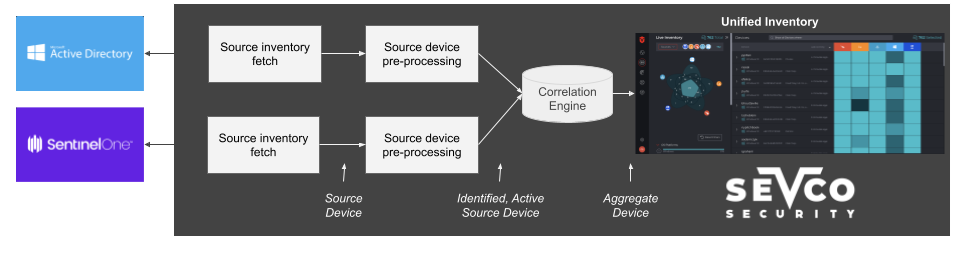
**Source records** are collected from your connected Source **Integrations** and contain attribute data about an asset. When Aurora ASM identifies a Source record, it compares its attribute data against data found in other Source records to for matching attributes. Once these attributes have been found, they are then aggregated and processed into **unified asset record** that is searchable on the **Live Inventory** page.
### Source Record States
The Source **record state** attribute is used to identify whether a Source record has been successfully processed, aggregated, and correlated with other Source records to form a **unified asset**. A Source record can be in one of the following states:
* **`Active`** – The Source record has been processed. Aurora ASM processes a Source Record when enough of its attributes match attributes from other Source Records to correlate them. Number of identical attributes and/or attribute type influence whether or not Source Records are correlated.
* **`Deduplicated Asset`** – Source asset records that are identified as a duplicate and are not further processed by the Asset Correlation Engine (ACE). Aurora ASM determines that a record is a duplicate when multiple Source records from the *same* Source contain enough identical attributes to indicate that they are actually the same asset. For example: if three Source records from a scanning tool contain the same MAC Address, but different UID and IPs, it is likely that multiple records have been created for the same Device asset.
* **`Insufficient Records`** – Source asset records that do not contain sufficient information (attributes) to uniquely identify an asset. This often occurs when a scanning tool only identifies an IP and is unable to identify uniquely identifiable attributes like Hostname, MAC Address, or Serial Numbers.
Source Record States are searchable from the **Source Inventory** page for a specific Integration using the **query builder**.
***
# Attribute Types
There are currently two **Attribute** types that can be used to search for telemetry events, which include **Source** and **Control** attributes.
## Source Attributes
**Source** attributes are attributes with values assigned by your Sources. These makes up the majority of attributes that can be used to search for assets and events across the Aurora ASM platform. Examples of these include the **Hostname**, **Last Activity** and **Agent Version** attributes.
> *Click here for a full list of Source attributes and example queries.*
## Control Attributes
**Control** attributes are attributes that Aurora ASM then assigns values to based on data pulled from your Sources. While **Source** attributes are used to measure a Source's **activity** and **presence** on an asset, Control attributes determine its **state** of its **Controls** and how it impacts their performance and ability to carry out their respective functions. **For example:** determining whether or not a Control's malware prevention functionality is in a disabled state for a Device.
While Control attributes can be filtered for and included in queries on both the **Live Inventory** and **Telemetry** pages, they are most commonly used to track **control-state** changes on the Telemetry page. Uses cases for these attributes can be found [here](#).
There are currently four Control attributes available:
* **`Encryption Status`** – The current status and level of encryption being provided by a Control
* **`Management State`** – The state or condition of a specific Control that indicates whether a device can be managed or how it is currently being managed
* **`Protection State`** – The state or condition of a Control that indicates the level of or how a device is being controlled
* **`Status`** – The state or condition of a specific Control that indicates whether a device is online, active, or able to be controlled
# Enterprise Endpoints
Enterprise endpoints represent a critical category of **devices** within an organization's IT infrastructure. This classification is used to distinguish between devices that are under corporate management and devices that exist outside of formal IT control structures.
In the Aurora ASM platform, devices in the enterprise-endpoint category have been observed by one or more of your **managed Sources**. Managed Sources are systems or platforms that can manage a device by modifying the state or configuration of it or its components. These Sources include but are not limited to, **endpoint security** solutions, **patch management** systems, and **directory services**.
> *Learn more about enterprise-endpoint classification and how devices are categorized*